Loading... Please wait...
Categories
 New Products
-
 $2,050.00
-
 $1,700.00
-
 $1,350.00
-
 $1,155.00
-
 $10,395.00
Our Newsletter
- Home
- Sewing Machines
- Baby Lock Array 6 Needle Embroidery Machine
- Home
- Embroidery Machines
- Baby Lock Array 6 Needle Embroidery Machine
- Home
- Multi-Needle Embroidery Machines
- Baby Lock Array 6 Needle Embroidery Machine
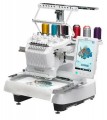
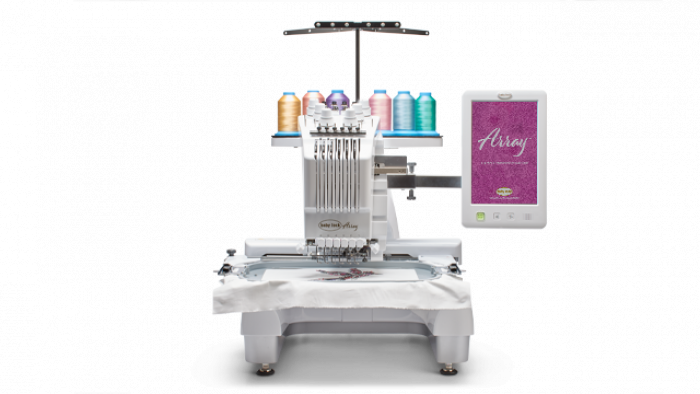
Baby Lock Array 6 Needle Embroidery Machine


Product Description
Baby Lock Array 6 Multi Needle Embroidery Machine
DISCOVER THE POWER OF THE ARRAY
If you've ever stood at your machine re-threading for the fourth time on a single design, watching your evening disappear one color change at a time, the Baby Lock Array 6 was built for exactly that moment of exhaustion. Load all six thread colors before you start, press go, and walk away — because with the IQ Intuition Monitoring App sending alerts directly to your phone when the bobbin runs low, a thread breaks, or the design completes, you don't need to babysit it anymore.
The 7-7/8" x 11-3/4" embroidery field is one of the largest you'll find in this class, giving you serious real estate for large-scale work, while the crosshair positioning laser lets you preview design placement before a single needle touches fabric - no guessing, no rehooping, no wasted material. Speed adjusts from 1,000 SPM down to 300 SPM for delicate or specialty threads, and individual tension control per needle means difficult metallics or sheers behave on their own needle without compromising the rest of your work. The TruView HD IPS touchscreen renders 16 million colors at up to 200% zoom, and the Color Visualizer lets you audition entire color schemes before committing. The free arm handles sleeves, bags, and tubular items that defeat flat-bed machines.
The Baby Lock Array multi-needle embroidery machine features include:
- 6 Needle Machine
- 7-7/8" x 11-3/4" Maximum Embroidery Field
- Hoops as small as 1-1/2” x 2-1/4”
- Embroidery Crosshair Positioning Laser
- IQ Intuition™ Monitoring App
- 126 Built-In Designs
- 50 built in fonts
- Intuitive Color Management
- Powerful thread management
- Wireless transfer of designs
- Design Database Transfer
- Embroiders at 1,000 Stitches Per Minute
Highlighted Features:
FREE ARM EMBROIDERY
Easily embroider anything you can think of! Tubular items like sleeves, pant legs, bags, and more are no problem with the free arm
SIX EFFICIENT NEEDLES
With six needles, you’ll love how quickly you can embroider large, multi-colored designs; and you can finish projects without excessive thread changes between jobs.
You will save time because you can embroider more colors and stitches before you have to rethread.
7-7/8 X 11-3/4 EMBROIDERY FIELD
Embroider on a massive 7-7/8" x 11-3/4" space, giving you more room than ever before!
Embroider in hoops as small as 1.5" x 2.25" or as large as 7.85x11.75" so you can pick the right sized hoop for the job.
EMBROIDERY CROSSHAIR POSITIONING LASER
Use the crosshair positioning laser to preview the position of your embroidery design. Then adjust the position and angle for precise alignment. Your embroidery will be perfectly placed every time.
Stop rehooping to get your project perfectly centered. The crosshair laser is an easy way to adjust the design placement to where you need it to stitch based on what your project needs.
IQ INTUITION™ MONITORING APP
Keep track of your project’s progress with this convenient feature that alerts your phone when the bobbin needs to be changed, if a thread breaks, if a thread needs to be changed and when stitching is done.
Increase your productivity with this app. Track stitching progress or get an alert you when a bobbins needs changing, a thread breaks, a thread needs to change, or your stitching is complete.
WIRELESS CAPABILITY
Wirelessly send designs to your Array by installing the free Design Database Transfer Software on your personal computer.
Using optional Palette 11 software, easily send designs to your computer for editing or to machine for stitching. Wirelessly download and install software updates for the machine.
INTUITIVE COLOR MANAGEMENT
Use Color Visualizer to effortlessly find a variety of color schemes for your projects. Select from random, gradient, vivid, or soft effects.
Reassign colors in your design and see the changes on screen, or use the Color Visualizer to see different color options for your design, either completely random or based on a few predefined colors.
EXPANDED TENSION RANGE
Convenient dials allow you to easily adjust upper thread tension to reduce puckering on the most delicate fabrics.
Individually adjust upper thread tension for each needle for better results with difficult threads and unusual materials.
TRUVIEW™ IPS LCD TOUCHSCREEN IN HD
This high-definition TruView IPS LCD touchscreen brings your embroidery designs to life. It displays over 16 million colors so every image is vivid and bold. Plus, large touchscreen buttons help with quickly editing designs and accessing machine settings.
The ability to zoom up to 200% on designs make it easy to bring your embroidery to life.
126 EMBROIDERY DESIGNS
Choose from 126 built-in embroidery designs with 60 exclusive designs. You’ll find inspiration for any embroidery project ready to go at the touch of a button.
FOUR HOOPS INCLUDED
The Array comes with four hoops, giving you more options to match to your projects every time and provide stability from the smallest to the largest hoop size.
Positioning grids are also included.
EMBROIDERS AT 1,000 SPM
Embrace larger, multi-colored designs and watch them stitch in no time! The Array works at up to 1,000 stitches per minute.
You can also stitch at speeds down to 300 stitches per minute for delicate materials or threads.
50 BUILT-IN FONTS
The Array comes with a vast variety of built-in fonts to help make every project unique. In addition to the 50 built-in resizable fonts, you can select from 11 additional large, decorative lettering styles. Now you can give every project a distinct look.
3 monograms with 15 monogram frame options are built in. Easily audition fonts until you find the perfect one for each embroidery.
SHORTCUT KEY TO EMBROIDERY SCREEN
For simple projects requiring no editing, use the shortcut key to minimize steps between setting the pattern and stitching.
ADMINISTRATOR LOCK
Get control over who can makes changes to settings or designs. Lock the settings screen to prevent unwanted changes to settings.
KEY OPTIMIZATION
Disable functions not needed for your projects to reduce errors and increase efficiency.
INCLUDED ACCESSORIES
The Array comes with lots of great accessories to help you create. For a full list, refer to the machine manual.
Accessories such as threading tools, screwdrivers, thread nets, and more can all be stored in the convenient accessory box.
More Features
- 50 font styles
- Unlimited designs can be loaded with a USB or wirelessly
- 24 Built-in tutorial videos
- Built-in memory (10MB)
- Bobbin system: front loading, vertical rotary hook
- Uses pre-wound bobbins (Class “L”)
- Push button, automatic needle threader for all six needles
- 2 LED lights to illuminate work area
- Large Full Color touch screen Upper thread breakage and low bobbin sensors
- Manual tension control for each thread
- Built in thread color conversions for popular brands
- Automatic thread trimmer (upper and lower)
- Start/stop button with lock feature
- Onscreen speed control while stitching
- Change screen and thumbnail background color
- Embroidery shortcut key
- Change embroidery position using speed keys
- Needle bar/frame move key repositions the hoop for easy access
- Advanced On Screen editing features
Included Accessories
- Accessory case
- Instruction guides
- Embroidery Design Guide
- Embroidery Frame Arms x 2
- Embroidery frames:
- 200mm x 300mm (7-7/8 X 11-3/4)
- 130mm x 180mm (7 X 5)
- 100mm x 100mm (3-7/8 X 3-7/8)
- 60mm x 40mm (2-1/4 X 1-1/2)
- Embroidery Grid sheets:
- 200mm x 300mm (7-7/8 X 11-3/4)
- 130mm x 180mm (7 X 5)
- 100mm x 100mm (3-7/8 X 3-7/8)
- 60mm x 40mm (2-1/4 X 1-1/2)
- Needle set x 2
- Prewound bobbin x 6
- Spool net x 6
- Spool mat x 6
- Spool cap x 6
- Touch pen
- Needle changing and threading tool
- Needle plate cover
- Oiler
- Cleaning Brush
- Screwdrivers x 4
- Wrench
- 60-Day Trial of Online Sewing Classes
- Plus more
Machine Specifications:
- Machine Weight: 84 lbs
- Maximum Embroidery Field: 7-7/8" x 11-3/4"
- Needle Type: HAX 130 EBBR or 130/705 H-E
- Bobbin Style: Convenient L bobbin to use prewound bobbins
- File Types: Uses .pes and .dst files
Warranty Info
- Product Casting: 25 years
- Defective Parts: 2 years
- Circuit Boards: 5 years
- Electrical: 5 years
- Labor: 1 year